


1、准备一台国外VPS, 具体免费VPS可以参照链接: https://www.xgcos.com/news/show-1135.html ,建议注册亚马逊EC2
2、创建实例,选择centos6.7系统
3、更新系统,在控制台输入命令
yum -y update
4、安装wget下载器
yum -y install wget
5、安装SS,执行以下命令
wget --no-check-certificate https://raw.githubusercontent.com/teddysun/shadowsocks_install/master/shadowsocks.sh
# 赋予执行权限
chmod +x shadowsocks.sh
# 执行安装并启动
./shadowsocks.sh 2>&1 | tee shadowsocks.log
执行过程中会叫你配置相应的密码、端口、加密方式,具体自行输入即可。
6、编辑配置文件(没有配置好或者需要修改配置)
vi /etc/shadowsocks.json
配置如下:
{
    "server":"服务器的IP地址",
    "server_port":服务监听的端口号,
    "local_address": "127.0.0.1",
    "local_port":1080,
    "password":"监听端口密码",
    "timeout":300,
    "method":"rc4-md5",
    "fast_open": false
}
多用户多端口配置:
{
    "server":"服务器IP地址",
    "local_address":"127.0.0.1",
    "local_port":1080,
    "port_password":{
         "8989":"password0",
         "9001":"password1",
         "9002":"password2",
         "9003":"password3",
         "9004":"password4"
    },
    "timeout":300,
    "method":"rc4-md5",
    "fast_open": false
}
7、运行前需要安装加密
yum -y install m2crypto
8、启动SS
/etc/init.d/shadowsocks start
其他命令
#停止
/etc/init.d/shadowsocks stop

#重启
/etc/init.d/shadowsocks restart

#状态
/etc/init.d/shadowsocks status
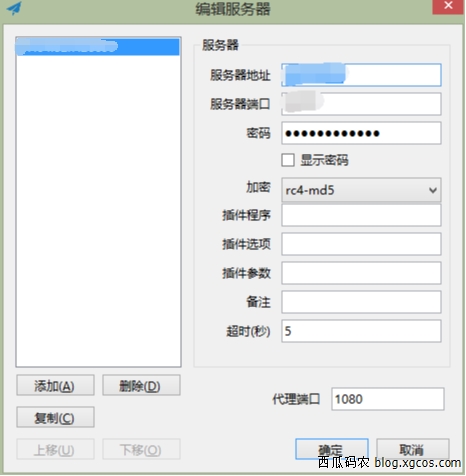
9、电脑下载客户端,下载地址: https://www.xgcos.com/down/show-1074.html
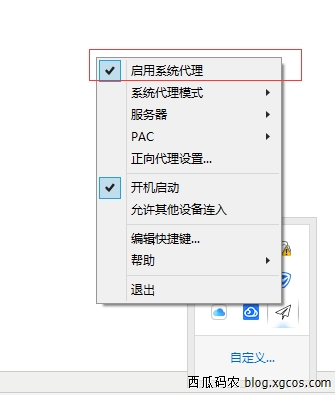
配置:
10、参考文档: https://github.com/shadowsocks/shadowsocks/wiki/Shadowsocks-%E4%BD%BF%E7%94%A8%E8%AF%B4%E6%98%8E


评论区